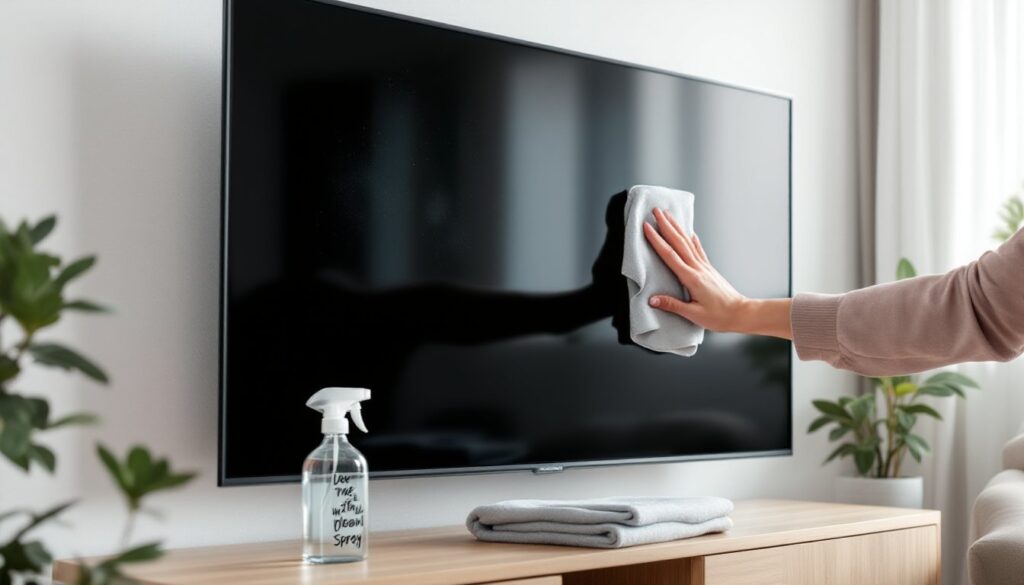
Here’s a scenario that plays out in thousands of homes every week: fingerprints and dust pile up on the TV screen, someone grabs the Windex from under the sink, and boom, permanent damage that wasn’t there five minutes ago. The short answer to whether you can use glass cleaner on your TV is almost always no, and understanding why could save you from replacing an expensive screen. Modern televisions aren’t built like the old glass-front CRT monitors many of us grew up with, and that difference matters more than most homeowners realize.
Table of Contents
ToggleKey Takeaways
- You cannot use glass cleaner on a TV because ammonia, alcohol, and acetone permanently damage the protective anti-glare and oleophobic coatings on modern screens.
- The safest cleaning solution for any TV is distilled water on a microfiber cloth, or a 1:1 mix of distilled water and white vinegar for stubborn smudges.
- Always spray cleaning solution onto the cloth first, never directly onto the screen, to prevent moisture from seeping into bezels and causing internal damage or dead pixels.
- Follow a simple five-minute cleaning process: power off and unplug, dust with a dry cloth, dampen a second cloth lightly, wipe gently in straight strokes, and buff dry immediately.
- Clean your TV screen weekly with light dusting and monthly with damp cleaning, adjusting frequency for homes with pets, kids, or high-traffic areas to avoid coating wear-down.
Why Traditional Glass Cleaners Can Damage Your TV Screen
Traditional glass cleaners, think ammonia-based formulas like Windex or similar products, contain harsh chemicals that can strip away protective coatings on modern TV screens. These coatings serve critical functions: they reduce glare, resist fingerprints, and in some cases provide scratch resistance. Once damaged, these coatings can’t be reapplied at home, leaving the screen permanently compromised.
Ammonia, alcohol, and acetone are the main culprits. They break down the delicate anti-reflective and oleophobic layers, leading to visible cloudiness, streaking, or discoloration that won’t buff out. What looks like a simple cleaning shortcut turns into a costly mistake, replacement panels often run $200 to $800 depending on size and model, and many manufacturers won’t cover chemical damage under warranty.
The same goes for abrasive cleaners, even ones marketed for electronics. Paper towels, rough cloths, and cleaning wipes with textures can scratch the screen surface. These scratches catch light and create distracting halos during dark scenes. When people ask “can I use glass cleaner on my TV,” they’re usually thinking of convenience, but that convenience comes with real risk.
Understanding Modern TV Screen Technology
To understand why glass cleaner on TV screens is a bad idea, it helps to know what you’re actually cleaning. Most flat-screen TVs fall into three categories: LCD (Liquid Crystal Display), LED (a type of LCD with LED backlighting), and OLED (Organic Light Emitting Diode). None of these have traditional glass front panels like old CRT sets.
LCD and LED screens use a layered construction with polarizing filters, liquid crystal layers, and plastic substrates. The outermost surface is typically a polymer film treated with anti-glare and anti-static coatings. OLED screens are even more delicate, with organic compounds sandwiched between ultra-thin layers that can degrade when exposed to solvents.
Plasma TVs, though rare now, used actual glass panels but still featured protective coatings vulnerable to ammonia and alcohol. If you’re working with any flat-screen manufactured in the last 15 years, assume it has specialty coatings that standard cleaners will harm. According to manufacturers like Samsung and LG, using unapproved cleaning agents can void warranties outright.
What to Use Instead: Safe TV Cleaning Solutions for Every Screen Type
The safest cleaning solution for any TV screen is distilled water. It leaves no mineral deposits, evaporates cleanly, and won’t interact with coatings. For light dust and fingerprints, distilled water on a microfiber cloth is all you need, no additives required.
If water alone doesn’t cut through oily smudges or stubborn grime, mix a 1:1 solution of distilled water and white vinegar. Vinegar is mildly acidic and effective against oils without the harshness of commercial solvents. Always apply the solution to the cloth, never directly to the screen, to avoid liquid seeping into bezels or vents.
For those who prefer ready-made products, look for screen-specific cleaning solutions labeled safe for LCD, LED, or OLED screens. Brands like WHOOSH. and Screen Mom are alcohol-free and ammonia-free, designed to clean without residue or damage. Read labels carefully, some “electronics cleaners” still contain isopropyl alcohol, which can dull anti-glare coatings over time.
Avoid anything with the following ingredients:
- Ammonia (common in glass cleaners)
- Alcohol (isopropyl, ethyl, or methyl)
- Acetone or nail polish remover
- Bleach or hydrogen peroxide
- Any petroleum-based solvents
When in doubt, consult your TV’s user manual. Most manufacturers publish cleaning guidelines in the maintenance section or on their support websites, and following those recommendations protects your warranty. Many home technology guides emphasize checking manufacturer specs before applying any cleaner.
The Best DIY Cleaning Method for TV Screens
The most effective DIY cleaning setup costs less than $10 and consists of three things: distilled water, a spray bottle, and high-quality microfiber cloths. Microfiber is key, its ultra-fine fibers lift dust and oils without scratching, unlike cotton, paper towels, or standard rags.
Buy at least two microfiber cloths: one for damp cleaning and one for dry buffing. Wash them regularly in warm water without fabric softener, which leaves residue that can streak screens. If you go the vinegar route, keep the mixture in a clearly labeled bottle and shake gently before each use to ensure even dilution.
Some folks swear by pre-moistened lens wipes designed for eyeglasses or camera lenses. These work in a pinch for spot-cleaning, but confirm they’re alcohol-free and ammonia-free. Zeiss and Koala wipes are popular options, though they’re pricier per use than a homemade solution.
For heavily soiled screens, say, after a toddler’s sticky hands or cooking grease splatter, you may need a two-pass approach. First, dry-wipe with a microfiber cloth to remove loose dust. Then lightly dampen a second cloth with your cleaning solution and wipe in gentle, horizontal strokes. Follow immediately with a dry cloth to prevent streaking. Never scrub or apply pressure: let the cloth and solution do the work.
This method works across all screen types and doubles for computer monitors, tablets, and smartphone screens. Keep your cleaning kit near the TV so it’s easy to maintain regularly rather than letting grime build up.
Step-by-Step Guide to Safely Clean Your TV
Cleaning a TV the right way takes five minutes and prevents damage that could cost hundreds to fix. Here’s the process, start to finish:
1. Turn off the TV and unplug it.
A dark screen makes smudges and dust more visible. Unplugging eliminates any risk of electrical shock and lets the screen cool if it’s been running, heat can cause cleaning solutions to evaporate too quickly and leave streaks.
2. Dust the screen with a dry microfiber cloth.
Use light, circular motions to lift loose dust and particles. Don’t press hard, dragging grit across the surface can scratch coatings. Work from top to bottom so dust falls away from already-cleaned areas.
3. Lightly dampen a second microfiber cloth.
Spray your distilled water or water-vinegar solution onto the cloth, never directly onto the screen. The cloth should be damp, not dripping. Excess moisture can seep into the bezel or internal components, causing shorts or corrosion.
4. Wipe the screen gently in horizontal or vertical strokes.
Avoid circular motions during the wet pass, as they can leave swirl marks. Use even, overlapping strokes to cover the entire screen. Focus extra attention on corners and edges where dust tends to accumulate.
5. Buff dry immediately with a clean, dry microfiber cloth.
This prevents water spots and streaking. Use the same gentle, straight-line motion. If streaks remain, you likely used too much solution, re-dampen the cloth more lightly and repeat.
6. Clean the bezel and base with the same damp cloth.
Plastic bezels and stands collect dust and fingerprints just like the screen. Wipe them down, then dry thoroughly. Avoid letting moisture pool in seams or vents.
7. Wait a few minutes before plugging back in.
Let any residual moisture evaporate fully, especially around edges and ports. Five minutes of air-drying is usually plenty.
Many professional cleaning guides recommend this same sequence for streak-free results. If you’ve been using glass cleaner on your TV in the past, inspect the screen closely, cloudiness or dullness may indicate coating damage that cleaning alone won’t fix.
Common TV Cleaning Mistakes to Avoid
Even well-meaning DIYers make avoidable errors that lead to screen damage or poor results. Here are the mistakes to watch out for:
Spraying liquid directly onto the screen. Liquid can run down into the bezel, seeping behind the panel or into electronics. It causes internal corrosion, dead pixels, or complete failure. Always apply solution to the cloth first.
Using paper towels, tissues, or old T-shirts. These materials contain wood fibers or rough textures that scratch delicate coatings. Microfiber is inexpensive and reusable, there’s no reason to risk it.
Applying too much pressure. Modern screens are thin and flexible. Pressing hard can damage the liquid crystal layer in LCDs or crack OLED substrates. Let the cloth and cleaning agent do the lifting: your hand should barely feel resistance.
Cleaning with the TV on. Heat accelerates evaporation, leaving streaks, and a lit screen hides smudges you’ll notice later. Plus, you’re working on a live electrical device, not worth the risk.
Using furniture polish, all-purpose cleaners, or disinfectant wipes. These often contain alcohol, ammonia, or oils that leave residue or strip coatings. Just because a product works on countertops doesn’t mean it’s safe for electronics.
Ignoring the manual. Some manufacturers explicitly allow or prohibit certain cleaners. A quick check can save you from invalidating your warranty or causing damage specific to your model.
Cleaning too aggressively or too often. Over-cleaning wears down coatings faster. A light dusting weekly and a damp wipe monthly (or as needed) is plenty for most households. Don’t treat your TV like a countertop.
How Often Should You Clean Your TV Screen?
Most TV screens need a light dusting once a week and a damp cleaning once a month, depending on your environment. Homes with pets, kids, or open windows accumulate dust and fingerprints faster, so adjust accordingly. If your screen looks clear, leave it alone, unnecessary cleaning wears down protective coatings over time.
Dust buildup isn’t just cosmetic. It traps heat around vents and can reduce screen brightness or cause uneven backlighting in LCD and LED models. A quick pass with a dry microfiber cloth takes 30 seconds and prevents grime from bonding to the surface.
For damp cleaning, watch for visible smudges, streaks, or a hazy appearance that dulling affects picture quality. Oily fingerprints (especially from kids) and cooking grease are the usual culprits. A monthly deep clean is sufficient for most setups unless you’re dealing with high-traffic areas or smoking indoors, which deposits residue faster.
Seasonal deep cleans, every three to four months, are a good time to also dust behind the TV, check cable connections, and clean the remote control. Remotes harbor more bacteria than most household surfaces, so wipe them down with a lightly dampened cloth and isopropyl alcohol on the buttons (just the remote, not the screen).
If you’ve installed your TV above a fireplace or in a kitchen, plan for more frequent cleanings. Soot, grease vapor, and heat accelerate grime buildup. In these environments, a quick wipe every two weeks keeps the screen clear without waiting for buildup to harden.
Bottom line: clean when you notice dirt, not on a rigid schedule. Your screen will last longer, and you’ll spend less time scrubbing.